
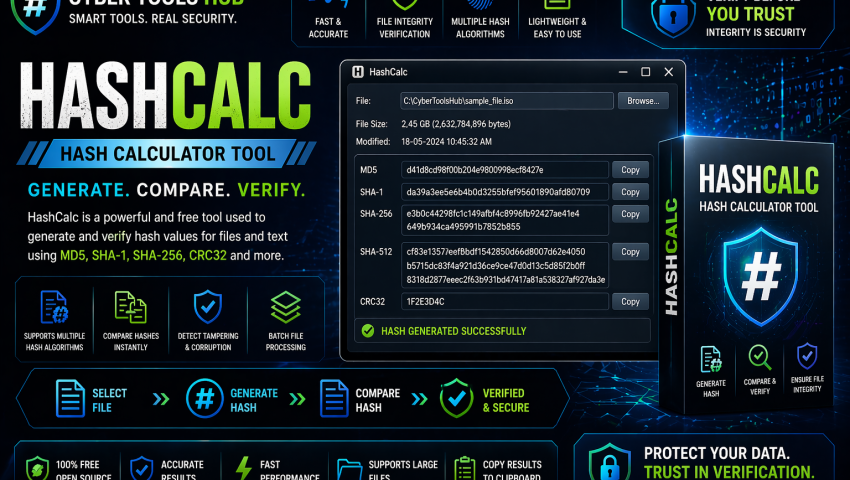
HashCalc – Hash Calculator & Integrity Verification Tool
-
 By Mrityunjay Singh
 - BLOGS
- Apr 24, 2026
- 2 minutes read
- 149 Views
In cybersecurity and digital forensics, verifying file integrity is essential for detecting tampering, validating evidence, and identifying malicious files. HashCalc is a popular checksum and hash calculator used by security professionals, forensic analysts, and system administrators for integrity verification and cryptographic hash generation.
Whether validating downloads or analyzing malware samples, HashCalc is a practical tool for security workflows.
What is HashCalc?
HashCalc is a utility designed to generate and verify cryptographic hash values for files and text.
It commonly supports algorithms such as:
- MD5
- SHA-1
- SHA-256
- SHA-512
- CRC32
- Additional checksum algorithms (depending on version)
These hashes act as digital fingerprints used to verify authenticity and detect changes.
Key Features
1. Multi-Algorithm Hash Generation
Generate hashes using multiple algorithms for security verification.
Useful for:
- File fingerprinting
- Integrity checks
- Malware sample identification
2. File Integrity Verification
Compare generated hashes against known values to verify whether a file has been altered.
Helps detect:
- Corrupted downloads
- Tampered files
- Unauthorized modifications
3. Text and File Hashing
Calculate hashes for:
- Individual files
- Large files
- Text strings
- Data samples
Useful in security testing and validation.
4. Malware Analysis Support
Use hash values during:
- Threat hunting
- IOC matching
- Malware sample triage
- Threat intelligence analysis
5. Digital Forensics Use
Supports forensic workflows involving evidence validation and integrity preservation.
Important for:
- Evidence hashing
- Chain of custody support
- Forensic verification
6. Lightweight Utility
Simple, fast, and practical tool for daily security operations.
Use Cases
File Integrity Verification
Verify downloaded software before installation.
Malware Analysis
Check suspicious file hashes against threat intelligence indicators.
Digital Forensics
Validate evidence images and collected artifacts.
Incident Response
Hash suspicious files discovered during compromise investigations.
Security Auditing
Use in integrity monitoring and validation workflows.
Cybersecurity Focus
From a cybersecurity perspective, HashCalc supports:
Tamper Detection
Detect unauthorized file changes.
Threat Hunting
Use hashes as indicators of compromise.
Malware Identification
Match suspicious files to known malicious samples.
Evidence Integrity
Support trustworthy digital investigations.
Common Features Analysts Look For
✔ MD5/SHA support
✔ File and text hashing
✔ Integrity verification
✔ CRC support
✔ Batch hash generation
✔ Lightweight setup utility
✔ Fast hash calculation
✔ Forensic validation support
How It Works
Typical workflow:
- Load file into HashCalc
- Select hash algorithm
- Generate checksum/hash
- Compare with trusted known hash
- Verify authenticity or detect modification
Where to Download
Download from trusted or official sources only.
Avoid unofficial or modified versions.
📥 Where to Buy / Download
To get HashCalc safely, use your official purchase or download link below:
👉 Buy / Download HashCalc Here
Recommended for:
- Malware Analysts
- DFIR Investigators
- Ethical Hackers
- Security Researchers
- System Administrators
Pros
- Easy to use
- Fast integrity verification
- Supports multiple hash algorithms
- Useful in forensic workflows
- Valuable for malware analysis
Limitations
- Some legacy algorithms like MD5 and SHA-1 are weak for modern security uses; stronger hashes such as SHA-256 are generally preferred.
- Primarily focused on hashing and verification
- Advanced automation may require additional tools
Related Tools Often Used With It
Often paired with:
- FTK Imager
- Autopsy
- Wireshark
Final Verdict
HashCalc is a valuable tool for file integrity verification, malware analysis, and forensic evidence validation.
Best suited for:
- Digital Forensic Analysts
- Threat Hunters
- Malware Researchers
- Ethical Hackers
- Cybersecurity Students
Mrityunjay Singh
Leave a comment
Your email address will not be published. Required fields are marked *