
iMazing: A Complete Guide to iPhone Data Management & Forensic Backups
-
 By Mrityunjay Singh
 - BLOGS
- Aug 04, 2026
- 4 minutes read
- 135 Views
Learn what iMazing is, its features, backup capabilities, data management tools, and how it supports digital forensics and mobile investigations.
Apple devices store an enormous amount of personal and professional information, including contacts, messages, photos, documents, application data, and device settings. Managing and preserving this information safely is important for both everyday users and digital investigators.
While Apple's Finder and iTunes provide basic backup functionality, many professionals require greater flexibility, detailed access to device data, and advanced backup management.
iMazing is a desktop application for Windows and macOS that allows users to manage, back up, and transfer data from supported iPhone, iPad, and iPod devices. It is widely used by IT administrators, businesses, and individuals for device management, and it can also play a supporting role in digital forensic workflows when handling logical backups and device information.
This guide explains what iMazing is, its major features, practical use cases, and its relevance in mobile data management and digital forensics.
What Is iMazing?
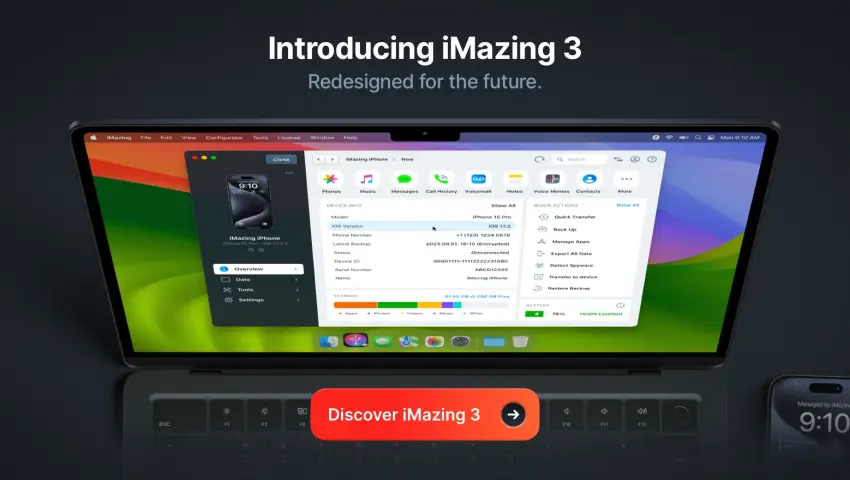
iMazing is an iOS device management application that enables users to create local backups, transfer files, manage device content, and access certain data stored on supported Apple devices.
Unlike standard backup tools, iMazing offers greater control over backup storage, file transfers, device information, and content management without relying exclusively on iCloud.
It supports various Apple devices, including:
- iPhone
- iPad
- iPod Touch
The exact features available depend on the device model, iOS version, and operating system.
Why iMazing Is Popular
Many users choose iMazing because it provides more flexibility than Apple's built-in backup solutions.
Benefits include:
- Local device backups
- Selective data transfer
- Backup management
- Device information viewing
- File export
- Storage management
- App management (subject to current platform support)
- Easy migration between devices
These features make it useful for both personal and professional environments.
Key Features of iMazing
Local Backups
One of iMazing's primary features is the ability to create local backups of supported Apple devices.
Unlike cloud-only solutions, local backups provide users with direct control over where backup files are stored.
This can be particularly useful for:
- Businesses
- IT departments
- Digital investigators
- Users with limited cloud storage
Backup Management
iMazing allows users to manage multiple device backups efficiently.
Users can:
- Create new backups
- Archive backups
- Restore compatible backups
- Review backup information
- Organize backup history
Maintaining multiple backup versions can simplify long-term device management.
Data Transfer
iMazing supports transferring supported content between Apple devices and computers.
Examples include:
- Photos
- Videos
- Music
- Documents
- Contacts
- Notes
- Voice recordings
Transfer capabilities depend on the type of data and device support.
Device Information
The application provides access to technical information about connected devices, such as:
- Device model
- iOS version
- Serial number
- Storage capacity
- Battery information (on supported devices)
- Device identifiers
This information assists IT administrators and investigators in documenting devices.
Message Export
Users can export supported message conversations into various formats for documentation or record-keeping.
This feature may assist organizations in maintaining communication records where appropriate and legally permitted.
Contact Management
iMazing enables users to:
- View contacts
- Export contacts
- Import contacts
- Backup address books
This simplifies migration and recovery of contact information.
Photo and Video Management
Large media libraries can quickly consume device storage.
iMazing helps users:
- Transfer photos
- Export videos
- Organize albums
- Backup media
- Free storage space
This makes long-term media management more convenient.
iMazing in Digital Forensics
Although iMazing is primarily a device management application, it can support certain aspects of digital investigations, particularly when working with logical backups or documenting device information.
Potential forensic-related uses include:
- Reviewing logical backup contents
- Exporting available user data
- Documenting device information
- Preserving locally stored backups
- Organizing evidence files
It is important to note that iMazing is not a replacement for specialized forensic acquisition tools. Comprehensive forensic examinations often require dedicated forensic software and validated procedures.
Benefits of Using iMazing
Organizations and users may benefit from:
- Simple backup management
- Local backup storage
- Flexible file transfers
- Reduced dependence on cloud services
- Better device organization
- Easy migration between devices
- Convenient content management
- Structured backup archives
Common Use Cases
Personal Users
Manage photos, contacts, messages, and backups more efficiently.
Businesses
Maintain company-owned Apple devices and simplify device migration.
IT Administrators
Create backup schedules, monitor devices, and document technical information.
Digital Investigators
Review logical backup data obtained through authorized processes and organize relevant evidence.
Educational Institutions
Manage Apple devices used by students and staff.
Best Practices for Using iMazing
To protect device data:
- Create regular backups.
- Store backups securely.
- Encrypt sensitive backups where appropriate.
- Verify backup completion.
- Keep software updated.
- Protect backup storage with strong access controls.
- Document backup dates and device information.
Regular backup verification helps ensure data can be restored when needed.
Limitations
While iMazing offers powerful device management features, it has certain limitations:
- It is not a dedicated forensic acquisition platform.
- Available features depend on Apple device and iOS compatibility.
- Some functions may change as Apple updates iOS.
- Access to certain protected data may be restricted by Apple's security architecture.
Users should select the appropriate tool based on their specific requirements.
Mrityunjay Singh
Leave a comment
Your email address will not be published. Required fields are marked *