
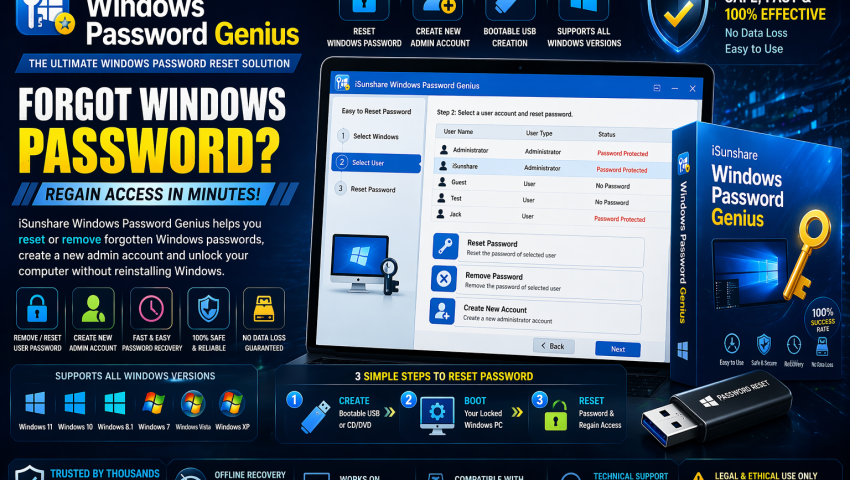
iSunshare Windows Password Genius
-
 By Mrityunjay Singh
 - BLOGS
- Apr 24, 2026
- 3 minutes read
- 115 Views
Losing access to a Windows system due to forgotten credentials can be a major issue for administrators, IT professionals, and incident response teams working on authorized systems. iSunshare Windows Password Genius is a system recovery utility designed to help regain access to Windows accounts on systems you own or are authorized to manage.
It is commonly used in password recovery, account access restoration, and system administration support.
What is iSunshare Windows Password Genius?
iSunshare Windows Password Genius is a Windows account recovery utility that can help reset or recover local account access on supported Windows systems.
It is commonly used for:
- Forgotten Windows password recovery
- Administrator account reset
- System access restoration
- IT support recovery tasks
- Authorized account maintenance
Key Features
1. Windows Password Reset
Helps reset or remove passwords for supported Windows local accounts.
Useful when:
- Passwords are forgotten
- Systems are locked out
- Access needs to be restored on authorized devices
2. Administrator Account Recovery
Can assist with regaining access to administrator accounts when legitimate access is lost.
3. Bootable Recovery Media Support
Many users use the tool through bootable media for recovery workflows.
Can support:
- Recovery USB creation
- Boot-based recovery
- Offline account reset workflows
4. Multi-Version Windows Support
Designed for use with various Windows environments (depending on version support).
5. User-Friendly Recovery Interface
Simple guided interface aimed at both professionals and general users.
6. System Recovery Utility
Can be part of broader IT troubleshooting and recovery toolkits.
Use Cases
Forgotten Password Recovery
Restore access to your own locked Windows system.
IT Administration
Assist users who have lost access to managed systems.
Authorized Incident Recovery
Support legitimate system access recovery after lockout situations.
System Maintenance
Useful in recovery and support scenarios.
Cybersecurity Focus
From a defensive security and administration perspective, iSunshare Windows Password Genius can support:
Account Recovery
Restore access to authorized systems.
Business Continuity
Reduce downtime caused by account lockouts.
Recovery Preparedness
Useful in disaster recovery toolkits.
Administrative Support
Support helpdesk and IT recovery workflows.
Common Features Users Look For
✔ Password reset support
✔ Admin account recovery
✔ Bootable recovery media
✔ Windows compatibility
✔ Easy recovery workflow
✔ User-friendly interface
✔ Account access restoration
✔ System recovery utility
How It Works
Typical workflow:
- Create recovery media
- Boot authorized target system
- Launch recovery environment
- Reset or recover account access
- Regain system access
Where to Download
Download only from official or trusted sources.
Avoid unofficial or modified copies.
📥 Where to Buy / Download
To get iSunshare Windows Password Genius safely, use your official purchase or download link below:
👉 Buy / Download iSunshare Windows Password Genius Here
Recommended for:
- IT Administrators
- Helpdesk Teams
- System Recovery Specialists
- Cybersecurity Professionals
- Windows Power Users
Pros
- Useful recovery utility
- Simple guided workflow
- Helpful for legitimate account lockouts
- Practical IT support tool
- Supports recovery scenarios
Limitations
- Use only on systems you own or are authorized to manage.
- Advanced enterprise scenarios may require broader recovery procedures.
- Feature availability may vary by edition/version.
Related Tools Often Used With It
Often paired with:
- Autopsy
- FTK Imager
- ActivePerl
Final Verdict
iSunshare Windows Password Genius is a practical tool for authorized Windows account recovery, access restoration, and IT support workflows.
Best suited for:
- IT Administrators
- Support Technicians
- Recovery Specialists
- Security Professionals
- Advanced Windows Users
Mrityunjay Singh
Leave a comment
Your email address will not be published. Required fields are marked *